Plot, section and 3D
Draw the rig on an infinite plan with snapping hanging positions, then check it in a section from stage left and a 3D venue view with beam cones, gel colours and an audience camera. Set focus points and every view follows.
LIGHTING DESIGN · EVENT CAD
BetaLighting plots, venues and paperwork in one friendly workspace. Draw the rig once: the schedule, patch, power report and 3D view all update as you go.
macOS, Windows & Linux · Free to try: everything works, print sheets carry a watermark until you add a licence key
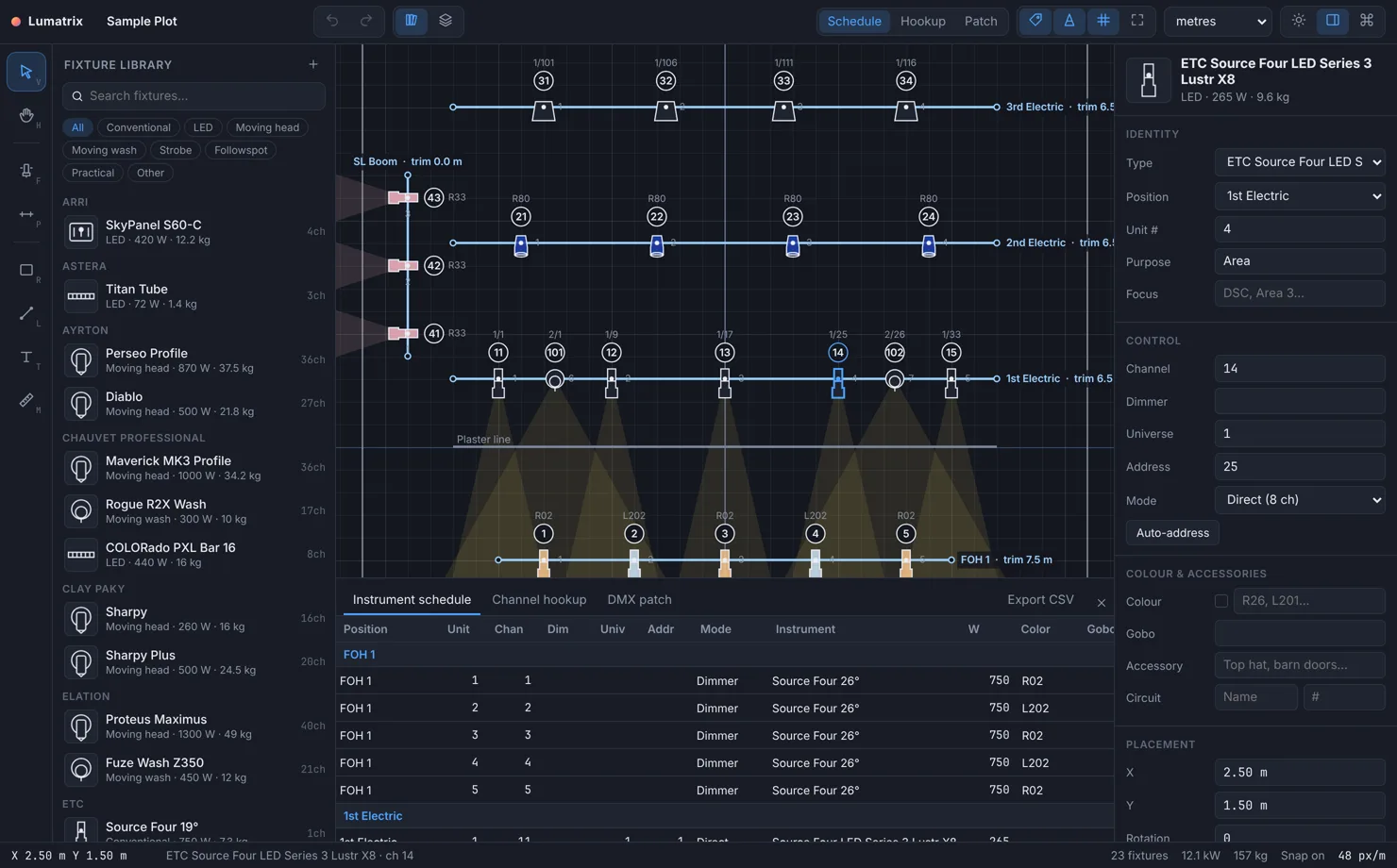
Draw the rig on an infinite plan with snapping hanging positions, then check it in a section from stage left and a 3D venue view with beam cones, gel colours and an audience camera. Set focus points and every view follows.
Instrument schedule, channel hookup, a DMX patch grid that flags overlaps, and power and weight reports update as you draw. Print sheets with a title block, fixture key and scale bar export to PDF or PNG, and schedules export to CSV.
Turn on Follow console and the 3D view listens for Art-Net and sACN: patched fixtures follow intensity, colour, pan, tilt and zoom from your desk. A built-in simulator works without a network.
MVR export and import, the rig exchange format used by lighting consoles and previs. Import manufacturer fixture files with real geometry and DMX modes. DXF in and out (save DWG as DXF first), glTF, OBJ, STL, FBX and USDZ models, and venue PDFs as scaled underlays.
Walls, doors and windows, raked seating with sightline checks, line sets with load limits, LED walls and screens. The event wizard lays out banquet, cabaret, theatre, classroom, boardroom or cocktail rooms in seconds, with live capacity.
Place distros, dimmers, nodes and consoles, then draw cables that route along pipes and round up to stock lengths. Phases balance in one click, and the Problems panel catches overloads, DMX clashes and unpatched fixtures.
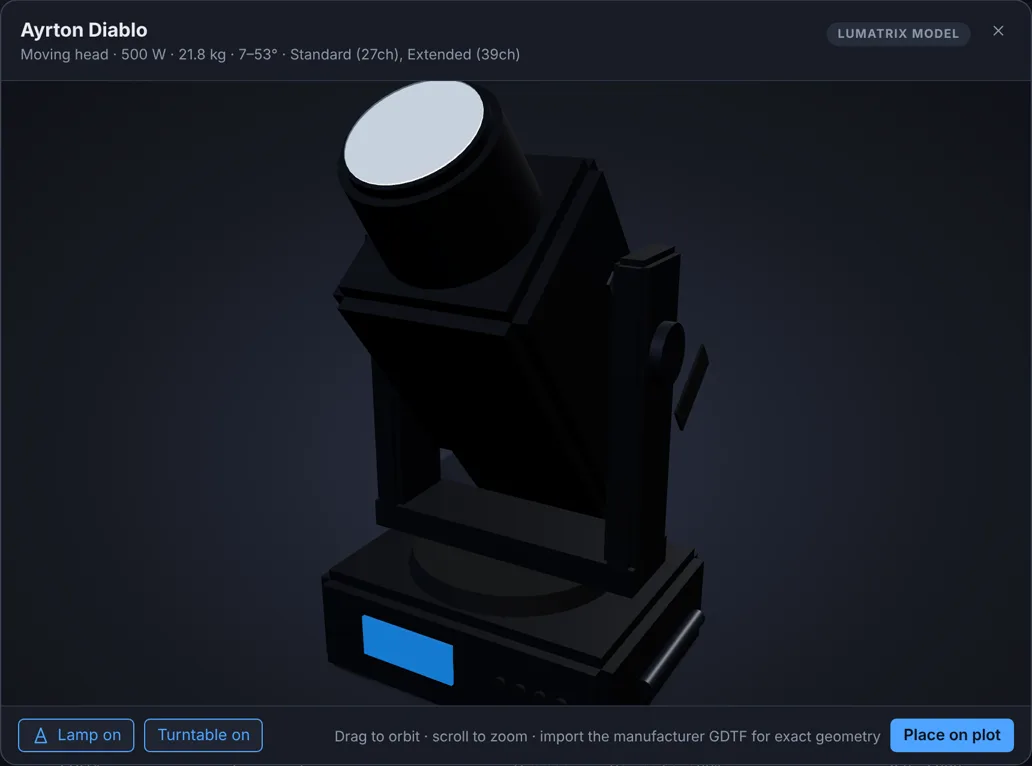
Over 200 instruments from ETC, Martin, Robe, Clay Paky, Ayrton, GLP, Vari-Lite, Chauvet, Elation, SGM, ARRI, Astera, Robert Juliat and more are built in, with modes, weights and power, each drawn in 3D at its published size, alongside branded audio, video, LED wall, control and power gear. Double-click any fixture for a studio-lit 3D view, or drop in the manufacturer's own fixture file for its exact geometry and full channel map.
Built-in 3D models are Lumatrix's own drawings, not the manufacturers'. Built-in weights and power are typical published figures for planning. Check the manufacturer's current data sheet before rigging or load calculations.
Yearly plans in Australian dollars. Each covers two computers and gets every update while it's active. Cancel any time from your account page: the versions you already have keep working. Try it free first: everything works, and print sheets carry a watermark until you add a key.
For event designers: rooms, furniture and floor plans, capacity, power and print sheets.
A$79per year
Everything: rig, patch, hookup, 3D previs with live DMX, every report, and Events too.
A$149per year
Prices in Australian dollars. The full licence includes the Events workspace: switch editions on the Home screen. An Events licence keeps the app in Events.
Version 0.1.15 beta, released 11/6/2026. Free to try. For now, get new versions from this page.
The installers aren't code-signed yet, so your computer asks before the first launch. On macOS, right-click Lumatrix CAD in Applications and choose Open. On Windows, choose More info, then Run anyway.
Lumatrix CAD has its own licence keys: a Lumatrix VJ licence doesn't unlock it, and a CAD key doesn't unlock Lumatrix VJ. Move a licence to another computer from your account page. For studio or education licences, or questions, email hello@lumatrix.app.